Spam-Digest
Spam-Digest is a Docker-first tool that reads the spam folder of one or more IMAP mailboxes and emails you an HTML digest of what landed there. An optional AI step (Anthropic Claude) labels each email probably legitimate, uncertain or spam, and signed links in the digest let you rescue, trust or delete emails from a web page, without opening a mail client.
It is the companion of Clean Mail Automation: Spam-Digest helps you catch real email wrongly flagged as spam, Clean Mail Automation deletes old email from folders you don't need to keep.
Overview
Links
- Website: spamdigest.gioxx.org
- Source code: github.com/gioxx/spam-digest
- Docker Hub image:
gfsolone/spam-digest - GHCR image:
ghcr.io/gioxx/spam-digest - Image tags:
latest(last release),X.Y.Z(a specific release),dev(currentmain)
Key features
- Daily digest email per mailbox, on a cron schedule. No email when the spam folder is empty, unless
SEND_IF_EMPTY=true. - Multi-mailbox: any number of IMAP accounts in one container (
MAILBOX_CONFIGS), each with its own spam folder and digest recipient. - Spam folder detection: if the configured folder doesn't exist, common names are tried (
Spam,Junk,INBOX.Spam,INBOX.Junk,[Gmail]/Spam). - AI triage (optional): only sender and subject are sent to Claude, never the body.
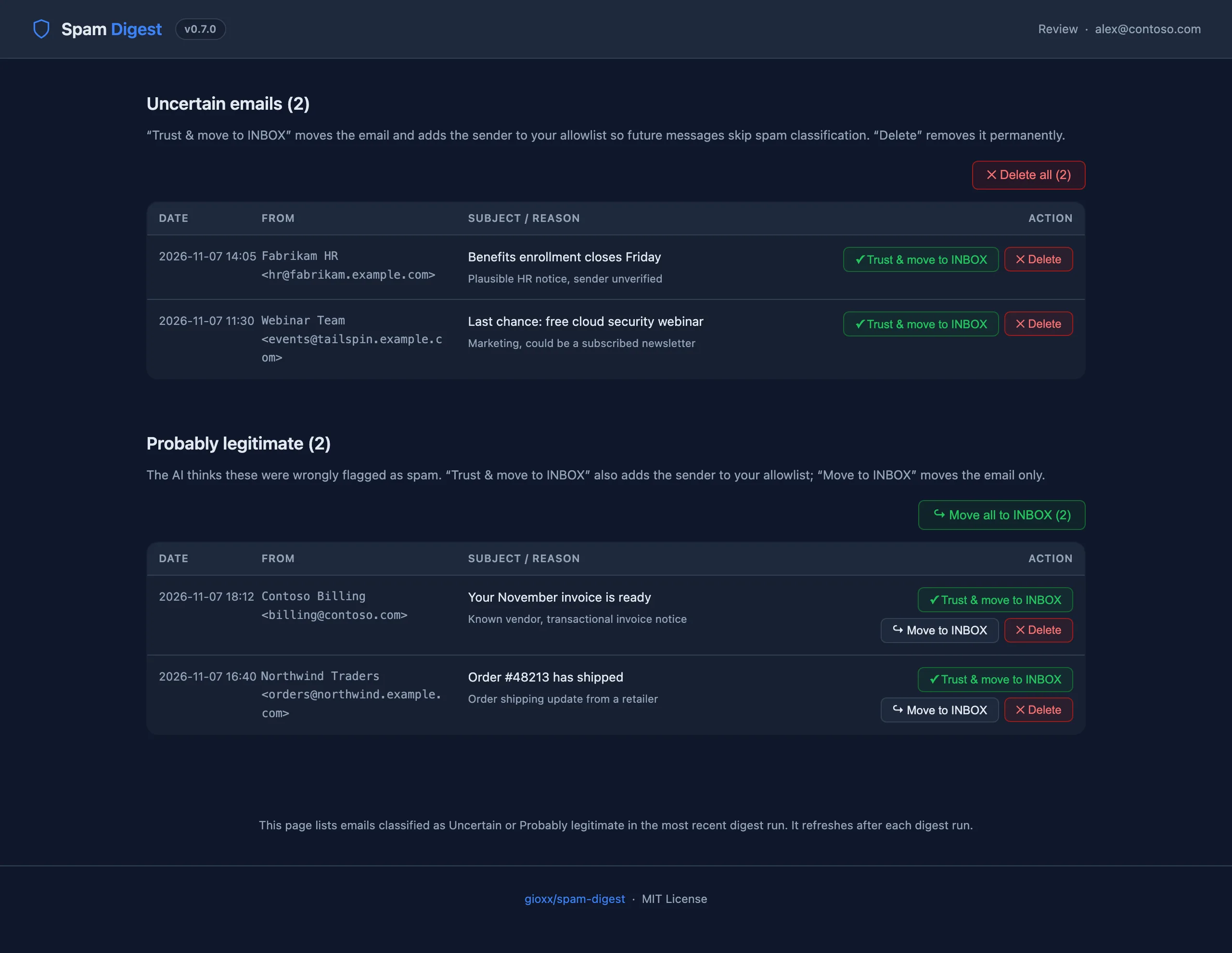
- Review page: move an email to INBOX (optionally adding the sender to the allowlist) or delete it, one at a time or a whole section at once.
- Blocklist and allowlist rules (sender, domain, subject keyword): blocked emails are deleted and allowed ones moved to INBOX at each run, and both are listed in the digest.
- Delete confirmed spam with one button, after a confirmation page.
- Status dashboard on port
8080, with buttons to run a digest now. - SMTP or Resend for sending the digest.
- Pure Python standard library, no dependencies.
Architecture at a glance
- Digest (
spam_digest.py): IMAP fetch, blocklist/allowlist rules, AI classification, digest HTML, email delivery, state file. Run by cron. - Web server (
status_server.py): dashboard and the signed pages (/review,/filters,/action/delete-spam). Started byentrypoint.sh. - Shared module (
shared.py): link signing and rotation, rules and allowlist storage, email delivery, file locking. - Entrypoint (
entrypoint.sh): writes the cron schedule, starts the web server, optionally runs a digest at startup (RUN_ON_START). - Data volume (
/data): last-run state, signing secret, link nonces, rules, allowlist and the actions log. Mount it as a volume so links and rules survive container updates.
Quick start
Docker Compose: single mailbox
services:
  spam-digest:
    image: ghcr.io/gioxx/spam-digest:latest
    container_name: spam-digest
    restart: unless-stopped
    ports:
      - "8080:8080"
    volumes:
      - spam_digest_data:/data
    environment:
      TZ: Europe/Rome
      IMAP_SERVER: imap.example.com
      EMAIL_USER: you@example.com
      EMAIL_PASS: your-imap-password
      SPAM_FOLDER: Junk
      SMTP_HOST: smtp.example.com
      SMTP_PORT: "587"
      SMTP_USER: you@example.com
      SMTP_PASS: your-smtp-password
      # Optional: AI triage
      AI_PROVIDER: anthropic
      AI_API_KEY: sk-ant-...
      # Optional: review, filters and delete links in the digest
      WEB_BASE_URL: https://spamdigest.example.com
      SCHEDULE_HOUR: "8"
      SCHEDULE_MIN: "0"

volumes:
  spam_digest_data:
docker compose up -d
The digest runs every day at 08:00 (TZ timezone). It does not run at container start unless RUN_ON_START=true. The dashboard is at http://localhost:8080.
The repository also ships a docker-compose.yml and an .env.example to start from.
Docker Compose: multi-mailbox
Set MAILBOX_CONFIGS to a JSON array. It replaces the single-mailbox IMAP variables; delivery, AI and schedule variables stay global.
    environment:
      MAILBOX_CONFIGS: |
        [
          {"imap_server":"imap.contoso.com","email_user":"alex@contoso.com","email_pass":"app-password","spam_folder":"Junk"},
          {"imap_server":"imap.example.com","email_user":"team@example.com","email_pass":"secret","spam_folder":"Spam","digest_to":"it@example.com"},
          {"imap_server":"mail.example.org","email_user":"info@example.org","email_pass":"secret","imap_use_ssl":false,"imap_port":143}
        ]
      SMTP_HOST: smtp.example.com
      SMTP_USER: alerts@example.com
      SMTP_PASS: your-smtp-password
Fields of each entry:
| Field | Default | Description |
|---|---|---|
imap_server | none | IMAP hostname. Required. |
imap_port | 993 | IMAP port. |
imap_use_ssl | true | false for a plain connection (e.g. port 143). |
email_user | none | IMAP username. Required. |
email_pass | none | IMAP password. Required. |
email_address | email_user | Mailbox identifier used in the digest, the dashboard and the links. |
spam_folder | Junk | Spam folder name. |
max_emails | 100 | Newest emails read per run. |
digest_to | email_address | Digest recipient for this mailbox. |
Building locally
git clone https://github.com/gioxx/spam-digest.git
cd spam-digest
cp .env.example .env    # then edit .env
docker build -t spam-digest .
docker run -d --env-file .env -p 8080:8080 -v spam_digest_data:/data spam-digest
Environment variables
Mailbox (single-mailbox mode)
| Variable | Default | Description |
|---|---|---|
IMAP_SERVER | none | IMAP hostname. Required unless MAILBOX_CONFIGS is set. |
IMAP_PORT | 993 | IMAP port. |
IMAP_USE_SSL | true | false to connect without SSL/TLS. |
EMAIL_USER | none | IMAP username. Required. |
EMAIL_PASS | none | IMAP password. Required. |
EMAIL_ADDRESS | EMAIL_USER | Mailbox identifier in the digest, dashboard and links. |
SPAM_FOLDER | Junk | Spam folder name. Common aliases are tried if it doesn't exist. |
MAX_EMAILS | 100 | Newest emails read per run. |
DIGEST_TO | EMAIL_ADDRESS | Digest recipient. |
MAILBOX_CONFIGS | none | JSON array for multi-mailbox mode (see above). |
Email delivery
| Variable | Default | Description |
|---|---|---|
EMAIL_PROVIDER | smtp | smtp or resend. |
SMTP_HOST | none | SMTP hostname. Required with smtp. |
SMTP_PORT | 587 | 465 uses implicit SSL, any other port uses STARTTLS. |
SMTP_USER / SMTP_PASS | none | SMTP credentials (login is skipped if either is empty). |
RESEND_API_KEY | none | Resend API key (re_...). Required with resend. |
DIGEST_FROM | SMTP_USER | Sender: a bare address or Name <address>. Required with Resend, on a verified domain (or onboarding@resend.dev for tests). |
SEND_IF_EMPTY | false | Send a digest even when the spam folder is empty. |
AI
| Variable | Default | Description |
|---|---|---|
AI_PROVIDER | none | anthropic to enable AI triage. |
AI_API_KEY | none | Anthropic API key. Required with anthropic. |
AI_MODEL | claude-haiku-4-5-20251001 | Claude model used for classification. |
AI_MAX_EMAILS | 50 | Maximum emails sent to the AI per run, across all mailboxes. The rest appear as Not classified. |
Schedule and web
| Variable | Default | Description |
|---|---|---|
SCHEDULE_MIN | 0 | Cron minute. |
SCHEDULE_HOUR | 8 | Cron hour. |
SCHEDULE_DAY | * | Cron weekday: * every day, 0 Sunday … 6 Saturday. Ranges and lists (1-5, 1,3) work too. |
RUN_ON_START | false | Also run a digest when the container starts. |
TZ | UTC | Container timezone, used by the schedule and timestamps. |
WEB_PORT | 8080 | Port of the dashboard inside the container. |
WEB_BASE_URL | none | Public address of the dashboard, e.g. https://spamdigest.example.com. Without it the digest has no review, filters or delete links. |
Email delivery
SMTP (default)
EMAIL_PROVIDER=smtp
SMTP_HOST=smtp.example.com
SMTP_PORT=587
SMTP_USER=you@example.com
SMTP_PASS=your-smtp-password
DIGEST_FROM=Spam Digest <spam-digest@example.com>
Resend
Resend sends over HTTPS with just an API key, no SMTP server needed. Resend sees the envelope and content of the digest.
EMAIL_PROVIDER=resend
RESEND_API_KEY=re_xxxxxxxxxxxxxxxxxxxxxx
DIGEST_FROM=Spam Digest <digest@yourdomain.com>
DIGEST_FROM must be on a domain verified in Resend (SPF and DKIM records). The free tier is plenty for a personal digest.
AI classification
With AI_PROVIDER=anthropic, Spam-Digest sends Claude only the sender and subject of each email (never the body) and gets back a label and a short reason:
| Label | Digest section | Meaning |
|---|---|---|
safe | 🟢 Probably legitimate | Likely real email wrongly flagged as spam. |
uncertain | 🟡 Uncertain | Can't tell; needs a human look. |
spam | 🔴 Confirmed spam | Clearly unwanted, commercial or malicious. |
Emails beyond AI_MAX_EMAILS, or left out of a malformed answer, go to Not classified. If the AI call fails, the digest is still sent, with every email under Not classified.
Cost is very low: one request per run with a short prompt. With Claude Haiku and 100 emails, expect a fraction of a cent per run.
The digest email
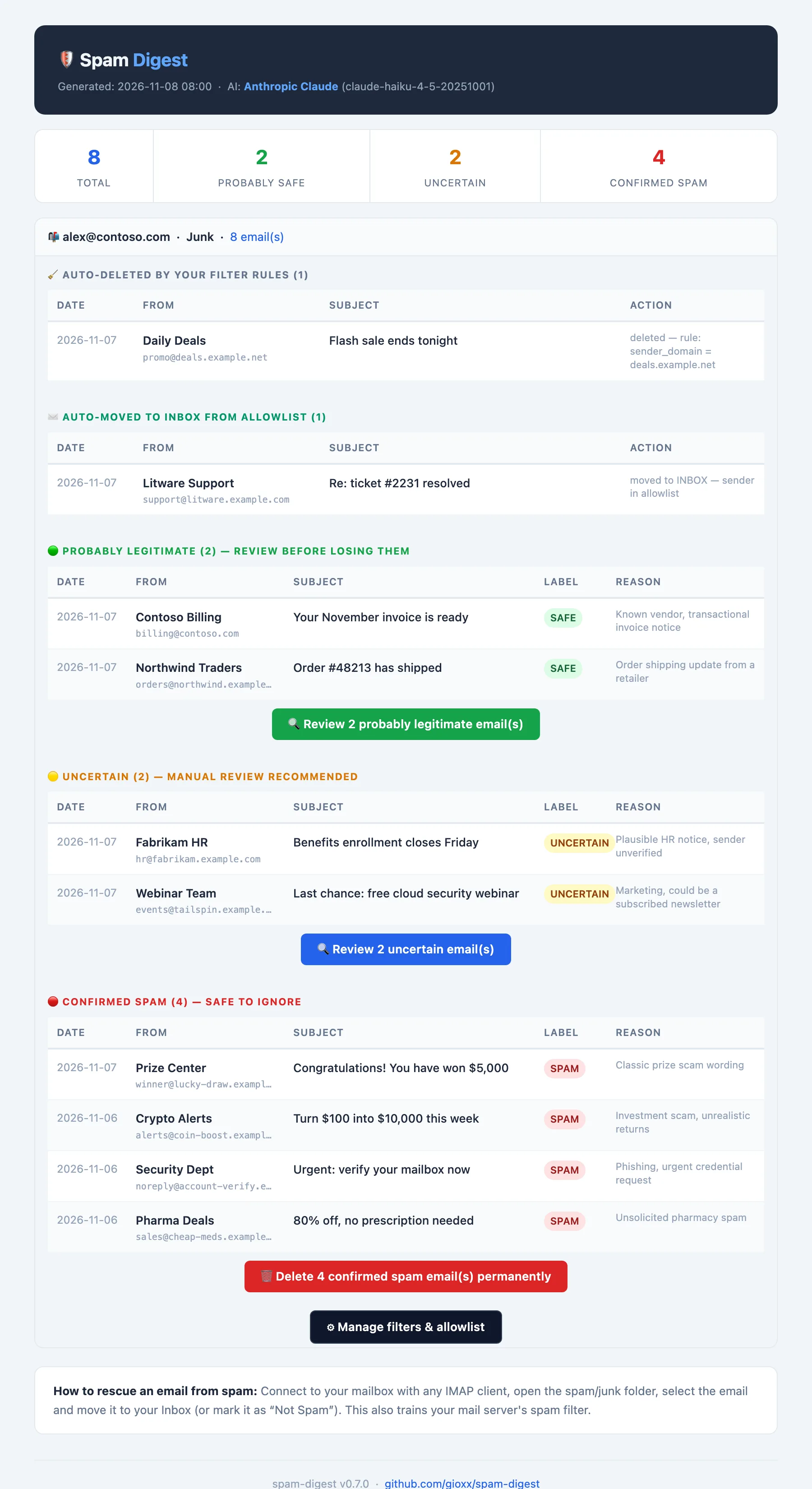
Each mailbox gets its own digest with:
- A summary of totals per label.
- Auto-deleted and Auto-moved to INBOX sections, listing what your blocklist and allowlist handled in this run.
- The emails grouped by AI label, with date, sender, subject and reason.
- Buttons, when
WEB_BASE_URLis set: Review under the probably legitimate and uncertain sections, Delete N confirmed spam email(s) under confirmed spam, and Manage filters & allowlist.
Web pages and links
The review, filters and delete pages have no login: each link carries an HMAC signature, made with a secret stored in /data. Each page is limited to one mailbox and to what the last digest listed.
Review page (/review)
Lists the uncertain and probably legitimate emails from the last digest.
| Action | Effect |
|---|---|
| Trust & move to INBOX | Moves the email to INBOX and adds the sender to the allowlist, so future emails from them skip the spam folder. |
| Move to INBOX (probably legitimate only) | Moves the email without trusting the sender. |
| Delete | Deletes the email permanently. |
| Delete all (N) (uncertain, 2+ emails) | Deletes every uncertain email in the list. |
| Move all to INBOX (N) (probably legitimate, 2+ emails) | Moves every probably legitimate email, without trusting the senders. |
Every action asks for confirmation. The link rotates with every digest: the one in an older digest stops working when a new digest is sent.
Filters page (/filters)
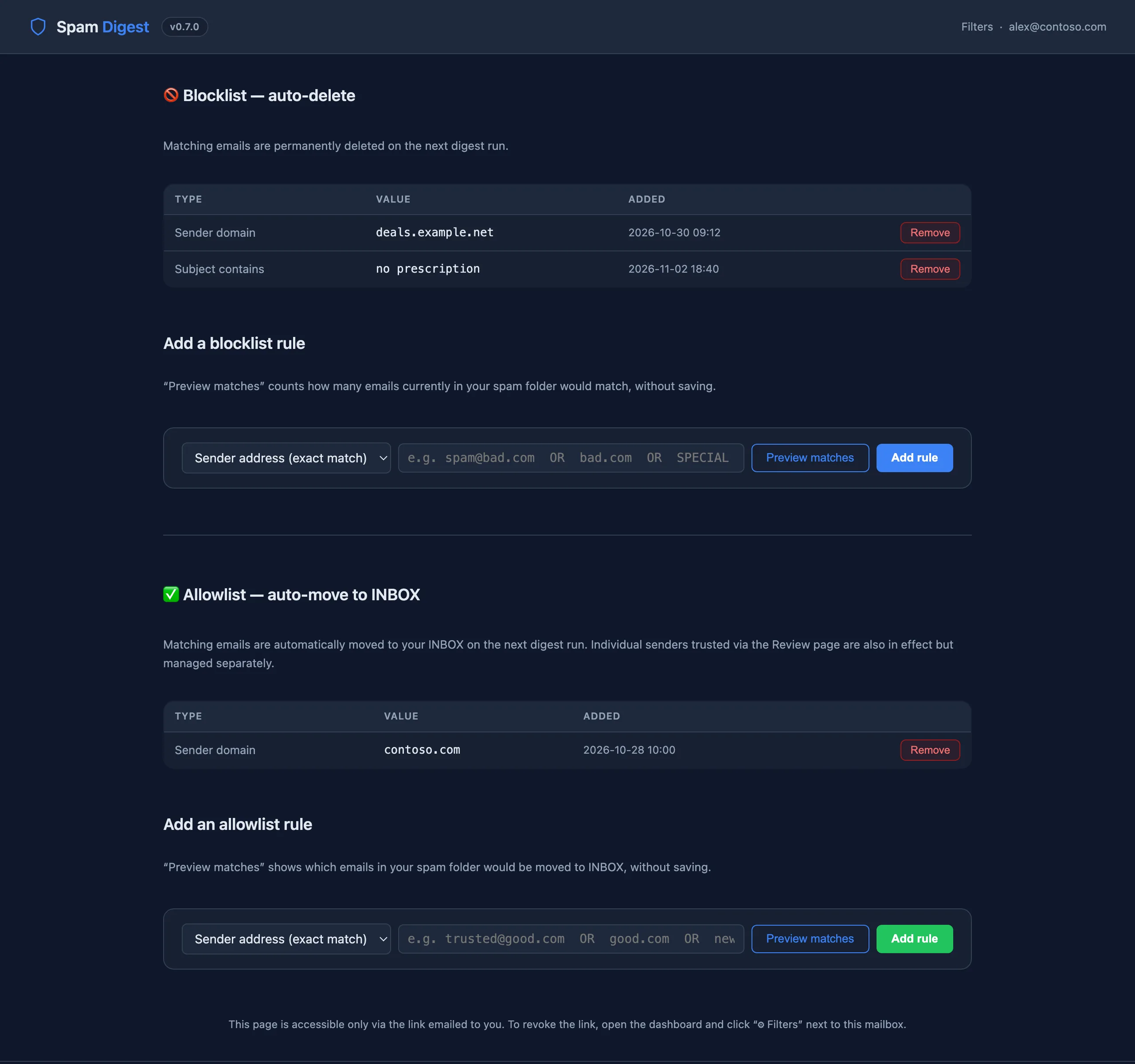
Manage two rule lists for the mailbox. Rule types: sender_exact (full address), sender_domain, subject_contains (case-insensitive).
- Blocklist: matching emails are deleted at the next digest run.
- Allowlist: matching emails are moved to INBOX at the next digest run. Senders trusted from the review page are applied too.
Preview matches shows which emails currently in the spam folder a rule would hit, before you save it. A fresh filters link is in every digest; the dashboard's Filters button rotates it and emails the new link to the mailbox's digest recipient (the old one stops working immediately).
Delete confirmed spam (/action/delete-spam)
The button in the digest opens a confirmation page: nothing is deleted until you confirm there, so mail security scanners that open links can't delete anything. The link:
- only deletes the emails the AI labelled spam in that digest;
- stops working once a newer digest with spam has been sent (use the newest one);
- expires after 7 days.
Limits and safety
- Web actions only touch the emails listed in the last digest, never other messages in the mailbox.
- Signed routes are rate-limited (30 requests per minute per IP) and every action is logged as JSON lines in
/data/actions.log. - Pages are sent with
Referrer-Policy: no-referrerand can't be framed, so links don't leak to other sites.
Dashboard
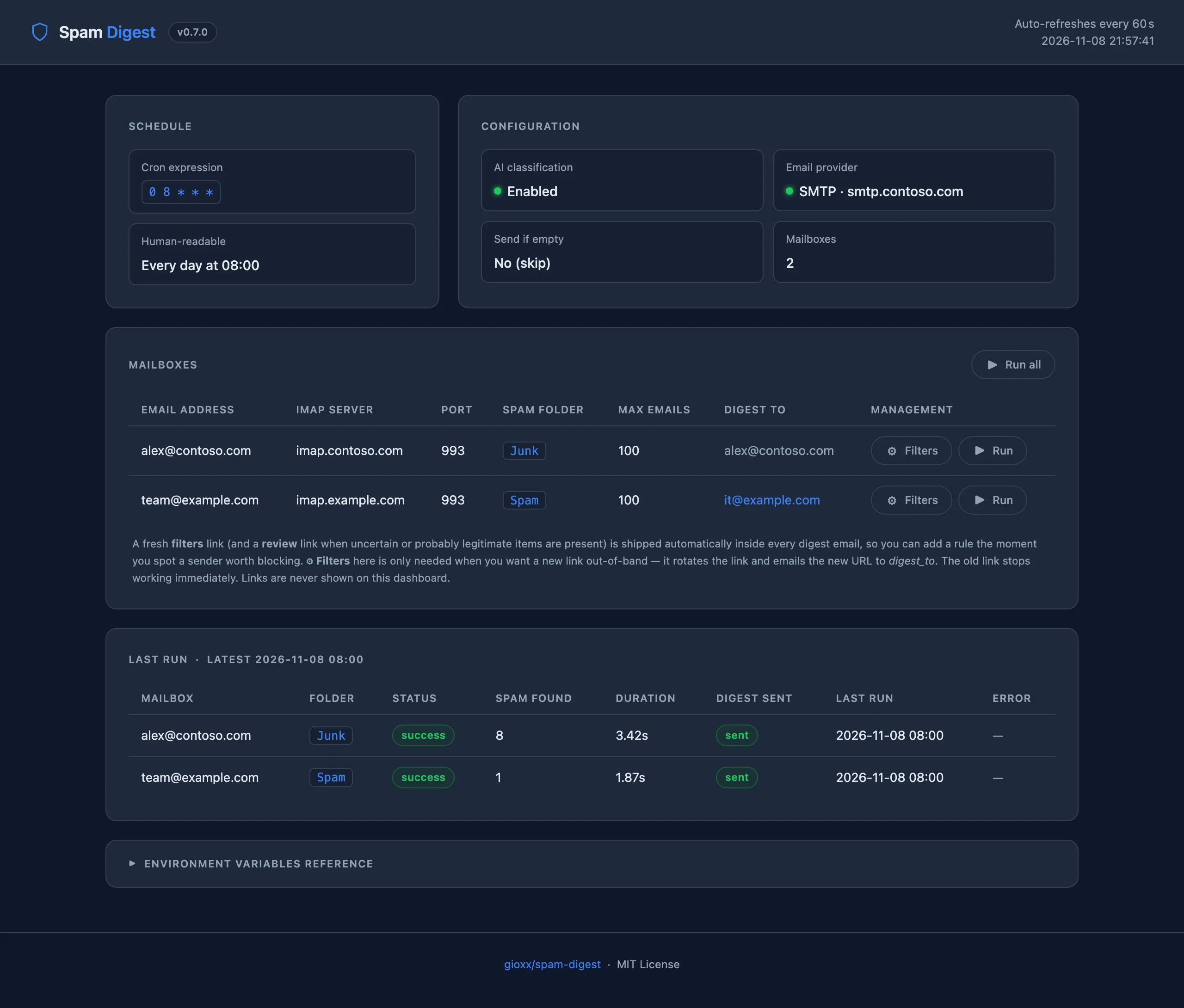
http://<host>:8080/ shows the schedule, the configuration status (AI, email provider), the configured mailboxes and the last run of each (status, emails found, duration, digest sent, errors). It refreshes every 60 seconds. From here you can:
- Run all: send a digest for every mailbox now (even if a spam folder is empty);
- Run (per mailbox): send a digest for that mailbox now;
- Filters (per mailbox, needs
WEB_BASE_URLand email delivery): rotate the filters link and email it to the mailbox's digest recipient. Links are never shown on the dashboard.
The dashboard has no login. Keep port 8080 on a trusted network or behind a reverse proxy with authentication. Its actions only accept POST requests and reject requests coming from other websites, but anyone who can reach the port can use them.
CLI
Inside the container (docker exec -it spam-digest python3 /app/spam_digest.py ...) or with the variables exported in your shell:
| Option | Description |
|---|---|
--dry-run | Fetch and classify, build the digest and save it to /tmp/spam_digest_dry_run_<recipient>.html, without sending. Nothing changes: rules are evaluated but no email is deleted or moved, links are not rotated, the state file is not updated. |
--force-send | Send the digest even when the spam folder is empty (overrides SEND_IF_EMPTY=false). |
--only EMAIL | Run only for the mailbox with this address. |
Outside Docker the script needs Python 3 and a writable /data directory. Scheduling is up to you (cron, systemd timer), and the web server is not started.
Rescuing an email by hand
Without the web pages, open the mailbox in any IMAP client, go to the spam/junk folder and move the email to Inbox (or mark it Not spam). This also helps your mail server's spam filter learn.
Troubleshooting
"Could not open any spam folder"
The configured SPAM_FOLDER and all the common names failed. Check the folder's exact name in your mail client (Gmail: [Gmail]/Spam, some servers: INBOX.Junk) and set it explicitly. The folder actually used is shown in the dashboard and the digest.
SSL errors when connecting to IMAP
The server doesn't offer SSL/TLS on that port. Use IMAP_USE_SSL=false (or "imap_use_ssl": false in MAILBOX_CONFIGS) together with the right port, usually 143.
The digest is not sent
- Check the container logs:
docker logs spam-digest. - With an empty spam folder, no digest is sent unless
SEND_IF_EMPTY=true(or you use Run on the dashboard). - SMTP: port
465uses implicit SSL, any other port STARTTLS; checkSMTP_HOST,SMTP_USER,SMTP_PASS. - Resend:
DIGEST_FROMmust be on a verified domain.
The digest has no Review / Delete / Filters buttons
Set WEB_BASE_URL to the address where you reach the dashboard. Buttons only appear for sections that have emails, and Review / Delete need AI triage.
"Invalid or revoked link" or "This link belongs to an older digest"
Links rotate with every digest. Use the most recent digest email, or rotate the filters link from the dashboard.
Links stopped working after an update
The signing secret and the link nonces live in /data. Without a volume they are recreated at every container update, which invalidates old links. Mount /data as a volume.
A run failed and the review list is empty
When a mailbox can't be read (IMAP error), its review and delete lists are cleared on purpose: the previous email IDs can't be verified against the mailbox. The next successful run fills them again.