Spam-Digest web pages, dashboard and CLI
Web pages and links
The review, filters and delete pages have no login: each link carries an HMAC signature, made with a secret stored in /data. Each page is limited to one mailbox and to what the last digest listed.
Review page (/review)
Lists the uncertain and probably legitimate emails from the last digest.
| Action | Effect |
|---|---|
| Trust & move to INBOX | Moves the email to INBOX and adds the sender to the allowlist, so future emails from them skip the spam folder. |
| Move to INBOX (probably legitimate only) | Moves the email without trusting the sender. |
| Delete | Deletes the email permanently. |
| Delete all (N) (uncertain, 2+ emails) | Deletes every uncertain email in the list. |
| Move all to INBOX (N) (probably legitimate, 2+ emails) | Moves every probably legitimate email, without trusting the senders. |
Every action asks for confirmation. The link rotates with every digest: the one in an older digest stops working when a new digest is sent.
Filters page (/filters)
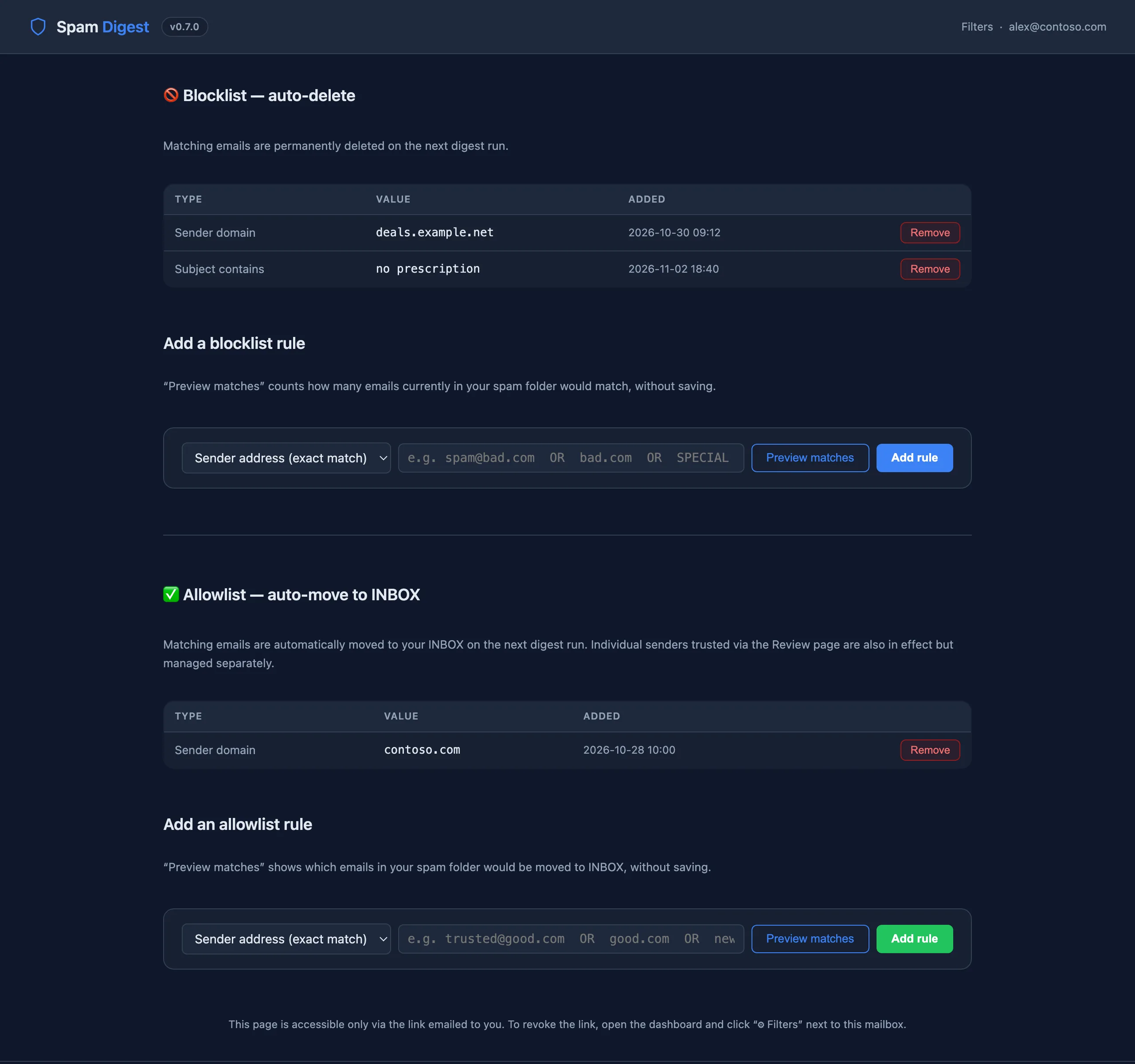
Manage two rule lists for the mailbox. Rule types: sender_exact (full address), sender_domain, subject_contains (case-insensitive).
- Blocklist: matching emails are deleted at the next digest run.
- Allowlist: matching emails are moved to INBOX at the next digest run. Senders trusted from the review page are applied too.
Preview matches shows which emails currently in the spam folder a rule would hit, before you save it. A fresh filters link is in every digest; the dashboard's Filters button rotates it and emails the new link to the mailbox's digest recipient (the old one stops working immediately).
Delete confirmed spam (/action/delete-spam)
The button in the digest opens a confirmation page: nothing is deleted until you confirm there, so mail security scanners that open links can't delete anything. The link:
- only deletes the emails the AI labelled spam in that digest;
- stops working once a newer digest with spam has been sent (use the newest one);
- expires after 7 days.
Limits and safety
- Web actions only touch the emails listed in the last digest, never other messages in the mailbox.
- Before moving or deleting, spam-digest checks the folder's
UIDVALIDITYagainst the value saved with the digest. If the folder was recreated or the server reset its IDs, the action is refused and nothing changes. - Signed routes are rate-limited (30 requests per minute per IP) and every action is logged as JSON lines in
/data/actions.log. - Pages are sent with
Referrer-Policy: no-referrerand can't be framed, so links don't leak to other sites.
Dashboard
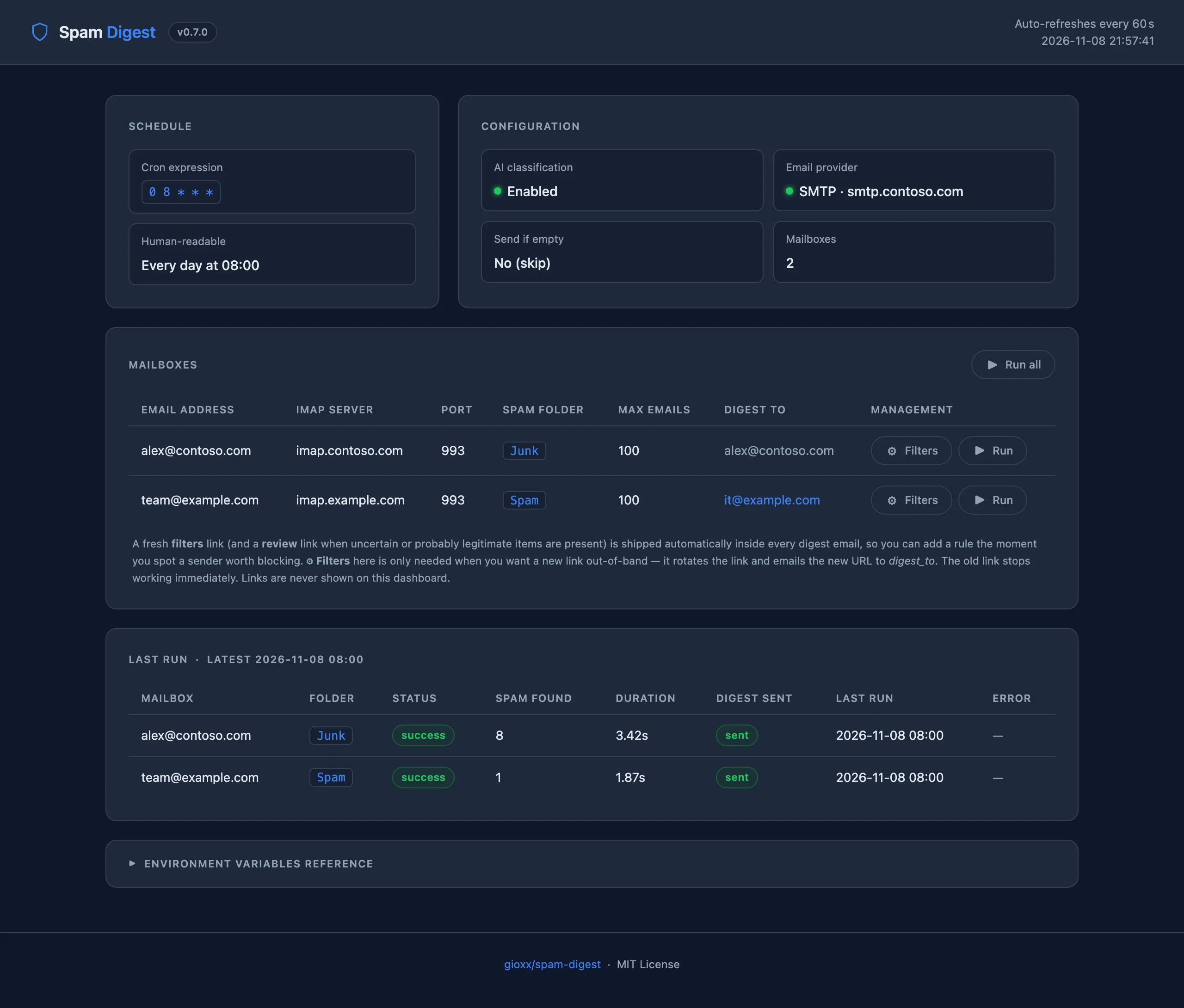
http://<host>:8080/ shows the schedule, the configuration status (AI, email provider), the configured mailboxes and the last run of each (status, emails found, duration, digest sent, errors). It refreshes every 60 seconds. The Active configuration panel lists the environment variables set for the container, with their values (secrets shown as set (hidden), MAILBOX_CONFIGS as the number of mailboxes); anything not listed uses its default. From here you can:
- Run all: send a digest for every mailbox now (even if a spam folder is empty);
- Run (per mailbox): send a digest for that mailbox now;
- Filters (per mailbox, needs
WEB_BASE_URLand email delivery): rotate the filters link and email it to the mailbox's digest recipient. Links are never shown on the dashboard.
The dashboard has no login by default: set DASHBOARD_PASS (and optionally DASHBOARD_USER, default admin) to require one. After 10 wrong passwords in 5 minutes an IP is blocked, even with the right password, until the window expires. Basic auth sends the password with every request, so serve the dashboard over HTTPS (reverse proxy) or keep it on a trusted network. Its actions only accept POST requests and reject requests coming from other websites.
CLI
Inside the container (docker exec -it spam-digest python3 /app/spam_digest.py ...) or with the variables exported in your shell:
| Option | Description |
|---|---|
--dry-run | Fetch and classify, build the digest and save it to /tmp/spam_digest_dry_run_<recipient>.html, without sending. Nothing changes: rules are evaluated but no email is deleted or moved, links are not rotated, the state file is not updated. |
--force-send | Send the digest even when the spam folder is empty (overrides SEND_IF_EMPTY=false). |
--only EMAIL | Run only for the mailbox with this address. |
Outside Docker the script needs Python 3 and a writable /data directory. Scheduling is up to you (cron, systemd timer), and the web server is not started.
Rescuing an email by hand
Without the web pages, open the mailbox in any IMAP client, go to the spam/junk folder and move the email to Inbox (or mark it Not spam). This also helps your mail server's spam filter learn.